



Dataset Structure
Before starting your analysis with the SmartstatXL Add-In, you need to ensure that your dataset is properly prepared. The layout and format of the dataset for SmartstatXL are similar to the data preparation for SPSS or other statistical applications.
Below is the structure of the dataset for the SmartstatXL Add-In.
- Variable Title: The first row of the dataset should contain the variable names.
- Data: The rows following the variable title should contain the data.
- Dataset Irregularities: Avoid having empty rows or columns between your data. If there are any rows or columns separating the data, the active dataset area will be considered to be at the current cursor location (active cell).
Dataset Example
Here is an example dataset for descriptive statistical analysis:
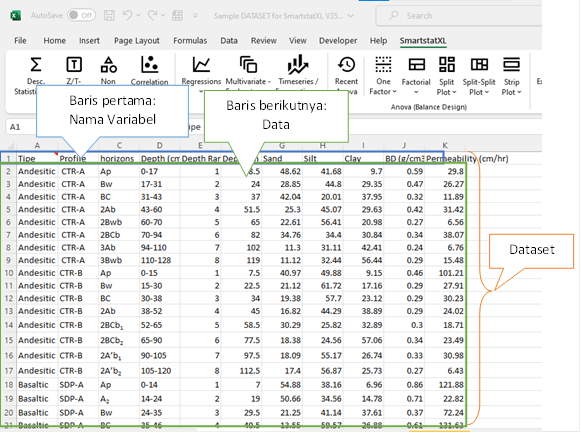
In this example dataset for descriptive statistical analysis:
- There is only one data set in a single worksheet (Sheet).
- The first row contains variable names, while the subsequent rows contain the data.
- There are no empty rows or columns between the data.
For situations where multiple datasets exist in a single worksheet, each dataset can be separated by an empty row or column. For illustration, consider the example dataset for Analysis of Variance (ANOVA). In that example, there are two datasets. The first dataset is suitable for analyses such as factorial or Split Plot, as well as for mixed-model analyses. The second dataset is more appropriate for analyses like Completely Randomized Design (CRD) or Randomized Complete Block Design (RCBD). It's important to remember that both datasets should be separated, for instance, by an empty column.
Please note, the two datasets are separated by an empty column (Column E).


